Find Out Which Meals Your Body Handles Well
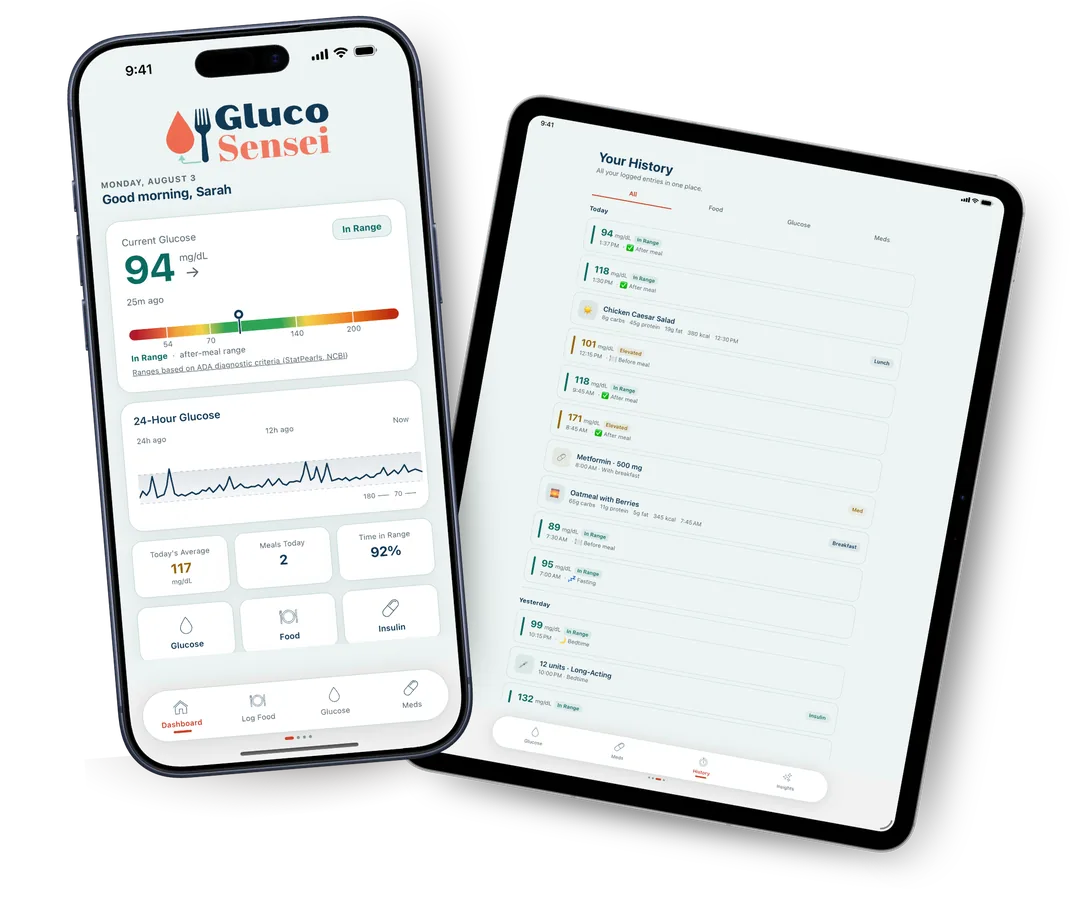
Log what you ate, then type in the number off your own meter. The app lines the two up and the pattern shows itself. These are your real readings, not an estimate of what a meal does to the average person.
Free on iPhone. Premium is $14.99 CAD a month or $119.99 a year, with a 14-day trial. Cancel any time.
- Works with any finger-prick meter. No CGM to buy
- Your meals and readings stay on your phone
- Built by a nutrition coach who reversed her own prediabetes
Two Things Make Blood Sugar So Hard to Work Out
Your readings look like random numbers
You write down your glucose numbers, but nothing connects them to what you ate. The pattern is in there somewhere. You just cannot see it yet.

Generic advice was not written for your body
Two people can eat the same lunch and get very different glucose readings. A meal plan built for the average person cannot tell you what happens in you.
Neither one is about trying harder. They are both about not having the information yet, and that part is fixable.
What GlucoSensei Actually Does
It connects two things you are probably already tracking separately, and shows you what they say together.
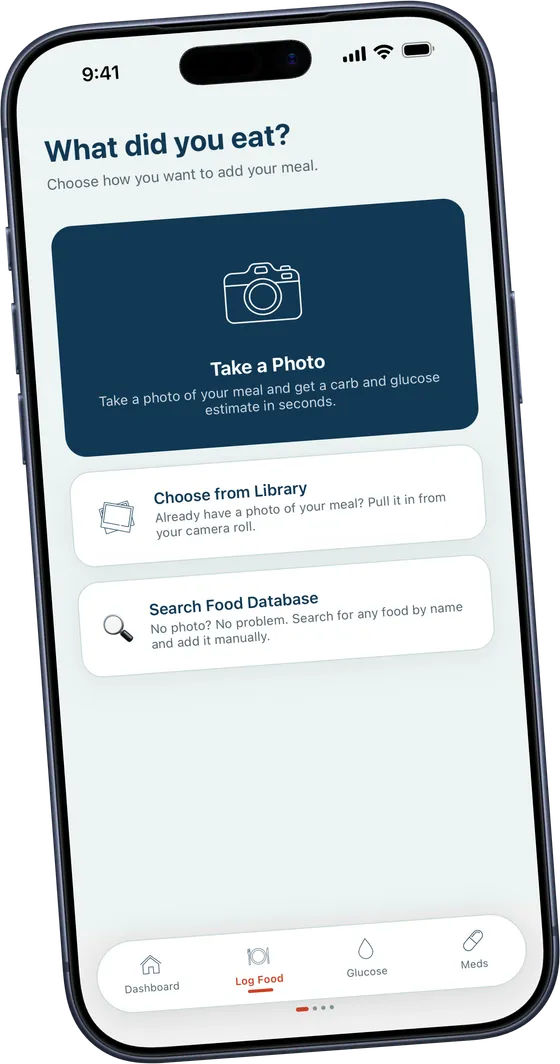
Photo or a few words
Take a picture of your plate, or just type in what you ate. The app works out the foods and the carbs for you, and you can correct anything before it saves. Your photo only leaves your phone when you ask for this, and nothing is kept afterwards.
Your meals, ranked
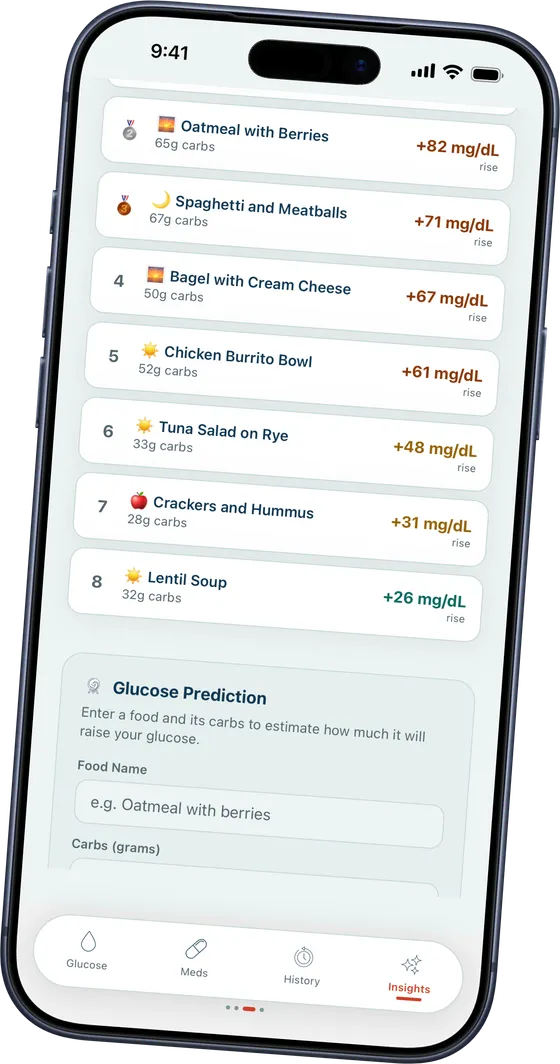
The app lines your meals up against your readings, shows you which foods move your numbers and which keep them steady. Every line comes from a reading you took yourself, so it is your body you are looking at, not a generic chart of averages.
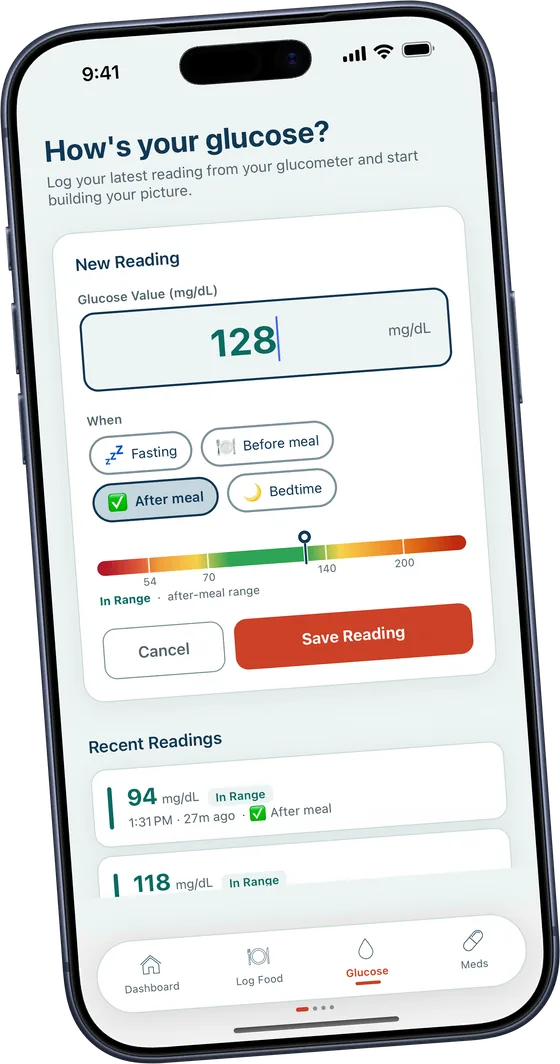
Works with any meter
No CGM needed. Type in the reading from your finger-prick meter before and after a meal and that is enough. It works in mg/dL or mmol/L, so there is nothing to set up and nothing new to buy. CGM integration is coming soon.
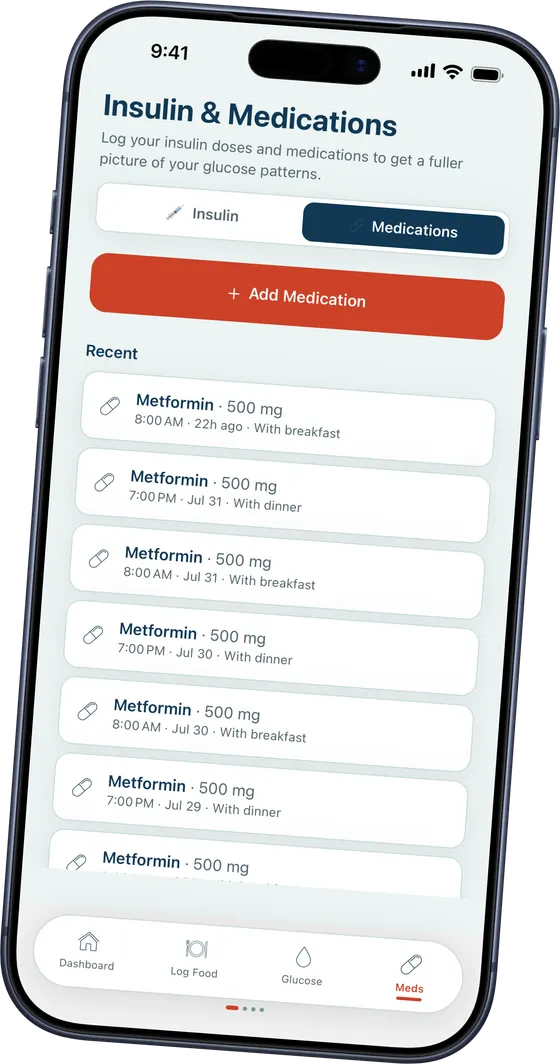
Insulin and meds too
Log the insulin and medications you already take, beside your food and your readings. Everything sits on one timeline instead of three, so when you see your doctor you have the whole picture rather than trying to remember it.
Screens show example data.
Where the Numbers Come From
This part matters more than it sounds like it does.
Some glucose apps will look at a photo of your dinner and draw you a response curve on the spot, with no reading behind it. That curve is an average. It is roughly what that meal tends to do across a lot of people, and if generic advice had worked for you, you would not be reading this page.
GlucoSensei waits for the number off your meter. Two people can eat the same bowl of oatmeal and end up in completely different places, so an average cannot tell you which one you are. Your chart gets built out of readings you actually took.
It does predict, once it has seen enough of your logging. But that prediction is made from your own meals and your own readings, so it is a guess about you rather than a guess about everybody.
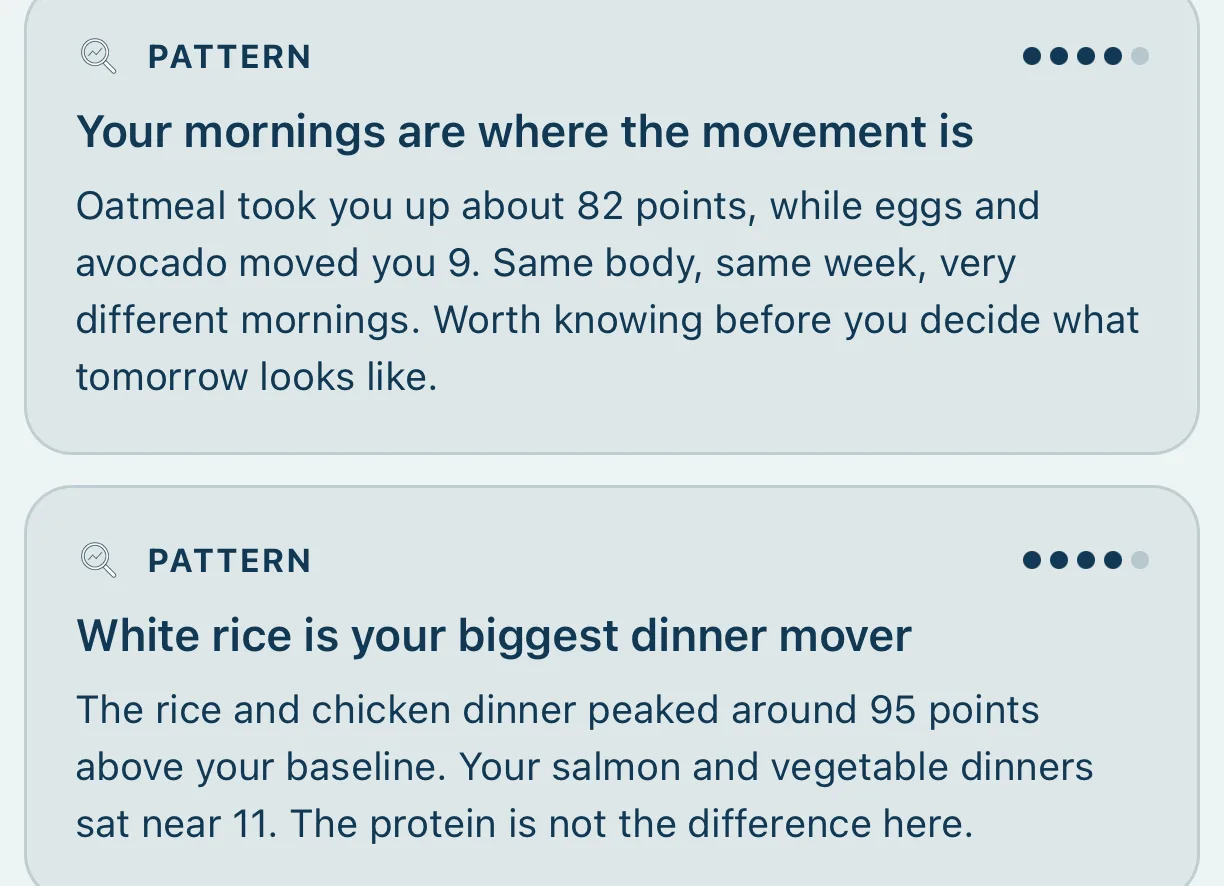
Your mornings are where the movement is
Oatmeal took you up about 82 points, while eggs and avocado moved you 9. Same body, same week, very different mornings.
White rice is your biggest dinner mover
The rice and chicken dinner peaked around 95 points above your baseline. Your salmon and vegetable dinners sat near 11.
Real numbers take a bit more effort than a photo, but that's the reason they are worth doing.
Three Steps, and Two of Them You Already Do
Log your meals
Take a photo or describe what you ate. The app sorts out the foods and the carbs and saves it.
Add your readings
Enter your glucose numbers from your own meter, before and after eating. That is the whole job.
See your patterns
The app shows you which meals kept you steady and which ones did not. Patterns start showing up after about 7 days of logging, and get clearer from there.

Free on iPhone. Premium is $14.99 CAD a month or $119.99 a year, with a 14-day trial. Cancel any time.

Hi, I'm Shelly. I Built This Because I Needed It
I lost close to 100 pounds eating low-carb, and I turned my prediabetes around. Then life got hard, keto started to feel far too strict, and some of the weight came back.
So I am not going to stand here and tell you I have it all sorted. I am still working it out too. What I do know is what the missing piece was: I could not see which of my own meals were doing what to my own numbers.
I am a Certified Holistic Nutrition Coach and a Low Carb Wellness Educator, and I have sat with a lot of people who were doing everything they were told and still could not get a straight answer. This is the tool I wanted for them, and for me.
- Certified Holistic Nutrition Coach
- Certified Ketogenic Lifestyle Coach
- Works in insulin resistance and metabolic health
Who It's For

Prediabetes and Type 2
See which of your everyday meals your body handles well, so food becomes something you understand instead of something you guess at.

Type 1 diabetes
Get a clearer picture of how food moves your levels. It sits alongside the routine you already have with your care team.

Low-carb and keto
Check what is actually working for you rather than assuming. Your own readings will tell you.

Just curious about your metabolic health
No diagnosis needed. If you want to know why some meals leave you flat by mid-afternoon, this shows you.
Real People, Real Patterns
“Quote goes here.”
First name, context“Quote goes here.”
First name, context“Quote goes here.”
First name, contextYour Numbers Are Yours
Health data is a personal thing to hand over, so here is exactly what happens to it.
- Your meals and readings are stored on your phone, encrypted.
- There is no account to create and no cloud copy of your logs.
- A meal photo only leaves your phone when you ask for the analysis, and it is not kept afterwards.
- No advertising and no tracking in the app. Your data is never sold or shared.
Questions People Ask
How does the meal photo work?
Take a photo of your food or describe your meal in plain text. The app works out the foods, estimates the carbs, protein and fat, and logs it. You can check and correct anything before it saves, and edit an entry later.
Where does my photo go?
Your meals, readings and photos live on your phone, encrypted. A photo only leaves your phone when you ask for the AI analysis, and it is used to give you that one answer and then not stored. There is no account to make, no cloud copy of your logs, and no advertising or tracking in the app.
How is this different from other food tracking apps?
Most food trackers count calories or macros and stop there. GlucoSensei puts your food next to your own glucose readings, so you see what a meal actually did in your body. You might expect a meal to be fine and find your readings say otherwise. That is the part guessing cannot give you.
There are a lot of glucose apps now. Why this one?
Most of them either need a CGM you have to keep buying, or they estimate your glucose response from a photo and a population average. GlucoSensei is built around the meter already sitting in your kitchen drawer and around your own numbers. It also does less on purpose. No workout plans, no recipe library, no chatbot. The one job here is connecting your food to your readings, and I would rather do that one thing properly.
Is there an Android version?
No, not currently. GlucoSensei is on iPhone and iPad only, but an Android version is next on my list.
What if I don't have diabetes, can I still use it?
Yes. Plenty of people use it because they eat low-carb, or because they are curious about their metabolic health. Understanding how food moves your blood sugar is useful whether or not you have a diagnosis.
Is GlucoSensei suitable for Type 1 diabetes?
Yes. The app helps you understand your own food and glucose relationship, which can sit alongside your existing routine. It does not replace medical advice. Always work with your healthcare team on treatment decisions.
Which foods raise blood sugar the most?
The honest answer is that it depends on you. Oatmeal barely moves some people and raises others quite a lot. The same goes for rice, fruit and bread. That is why the app measures what happens in your body instead of handing you a list to avoid.
Do I need a CGM, or will a regular finger-prick meter work?
No CGM needed. Any standard finger-prick meter works. Log your readings before and after meals and the app does the rest. If you do use a CGM you can enter those readings the same way, and CGM integration is coming soon.
Will this tell me what to eat, or do I have to work that out myself?
It gives you the data and the patterns so you can make your own call. There is no rigid meal plan. Think of it as a map of how your body responds, and after a while you will know your own map well.
Can I use this alongside my doctor's advice or medication?
Yes. It is built to sit alongside your existing care, not replace it. Tracking your food and glucose gives you something concrete to bring to your appointments. Keep following your healthcare provider, and never adjust your medication based on app data alone.
How soon will I see patterns?
Insights need at least 7 days of consistent logging before they appear. The more meals and readings you add, the clearer it gets. Even in the first few days you may spot a connection you did not expect.
What does it cost?
The free version covers logging your food, glucose, insulin and medications, plus your dashboard and recent history. Premium adds the meal photo analysis, the insights, the glucose predictions and your full history. It is $14.99 CAD a month or $119.99 a year, with a 14-day free trial for new subscribers. It is billed through your Apple Account and you can cancel any time in your Apple settings.
Does it work outside Canada and the US?
Yes. The app supports mg/dL and mmol/L, so you can log in whichever unit your meter uses. Set your preference once and you are done.
What's Free, and What Premium Adds
You can log everything and watch your own dashboard without paying. Premium is for when you want the app to do the reading for you.
Free
No cost, and no account to make.
- Log your food, glucose, insulin and medications
- Your dashboard and 24-hour chart
- Your recent history
Premium
$14.99 CAD a month, or $119.99 a year.
- Everything in the free version
- Meal photo analysis
- Your personalised insights
- Glucose predictions
- Your full history
New subscribers can start with a 14-day free trial. Billing runs through your Apple Account, and you cancel it in your Apple settings rather than here.
Stop Guessing. Start Seeing What Works for You.
Your next reading is a data point instead of a mystery.

Free on iPhone. Premium is $14.99 CAD a month or $119.99 a year, with a 14-day trial. Cancel any time.